UPSSSC Inter Level Apply Online 2026: Step by Step, Fee, Last Date

Updated on 22 November 2026
The UPSSSC Inter Level apply online 2026 process is running on upsssc.gov.in under Advertisement 26-Exam/2026, and the form can be submitted till 1 December 2026. There is no new registration for this recruitment. A candidate logs in with the PET 2025 registration number, so most of personal details comes on the screen automatically and only the post choice, the qualification details and the fee are left to the applicant.
In this article we have given the dates, the things to keep ready, the step by step process, the fee payment and e-challan method, what to do if the payment fails, the correction rules and the common mistakes. For the 1,784 vacancies and the exam pattern, read the main UPSSSC Inter Level 2026 article. Check the eligibility and age limit before you pay the fee.
Download the official notification (Advertisement 26-Exam/2026):
⬇ Download Official Notification PDF
UPSSSC Inter Level Apply Online 2026 Dates
Event | Date |
|---|---|
Online application and fee payment start | 10 November 2026 |
Last date to register, pay the fee and submit the form | 1 December 2026 |
Last date for fee reconciliation and correction in the form | 8 December 2026 |
Main Exam date | Not announced in the notice |
The online application has been started on 10 November 2026, as given in the table. The notice says that no application and no fee will be accepted after 1 December 2026. The extra days up to 8 December are only for the bank to reconcile a fee that was paid, and for the correction of the form. The notice does not print the closing time on the last date, so do not leave the work for the last evening.
Things to Keep Ready Before Applying
The PET 2025 registration number and the scorecard
The mobile number and the e-mail ID which were given in the PET 2025 application. The OTP will come only on these two.
The Intermediate certificate or marksheet, with the board name, the year, the roll number and the date of issue of the certificate.
The CCC certificate, if you will select Samaj Kalyan Paryavekshak, Gram Vikas Adhikari or Gram Panchayat Adhikari. The experience proof is needed for Farm Lipik and Bikri Karta.
The category, EWS, disability, ex-servicemen or other certificates in the notice's format, which you will be asked to show later.
A debit card, credit card, net banking or UPI for the fee. A payment at an SBI branch is possible only through the SBI e-challan.
The notice do not ask to upload any certificate in this form. They are checked when the commission calls for them, so keep the originals and a self attested copy ready.
How to Apply Online for UPSSSC Inter Level 2026 Step by Step
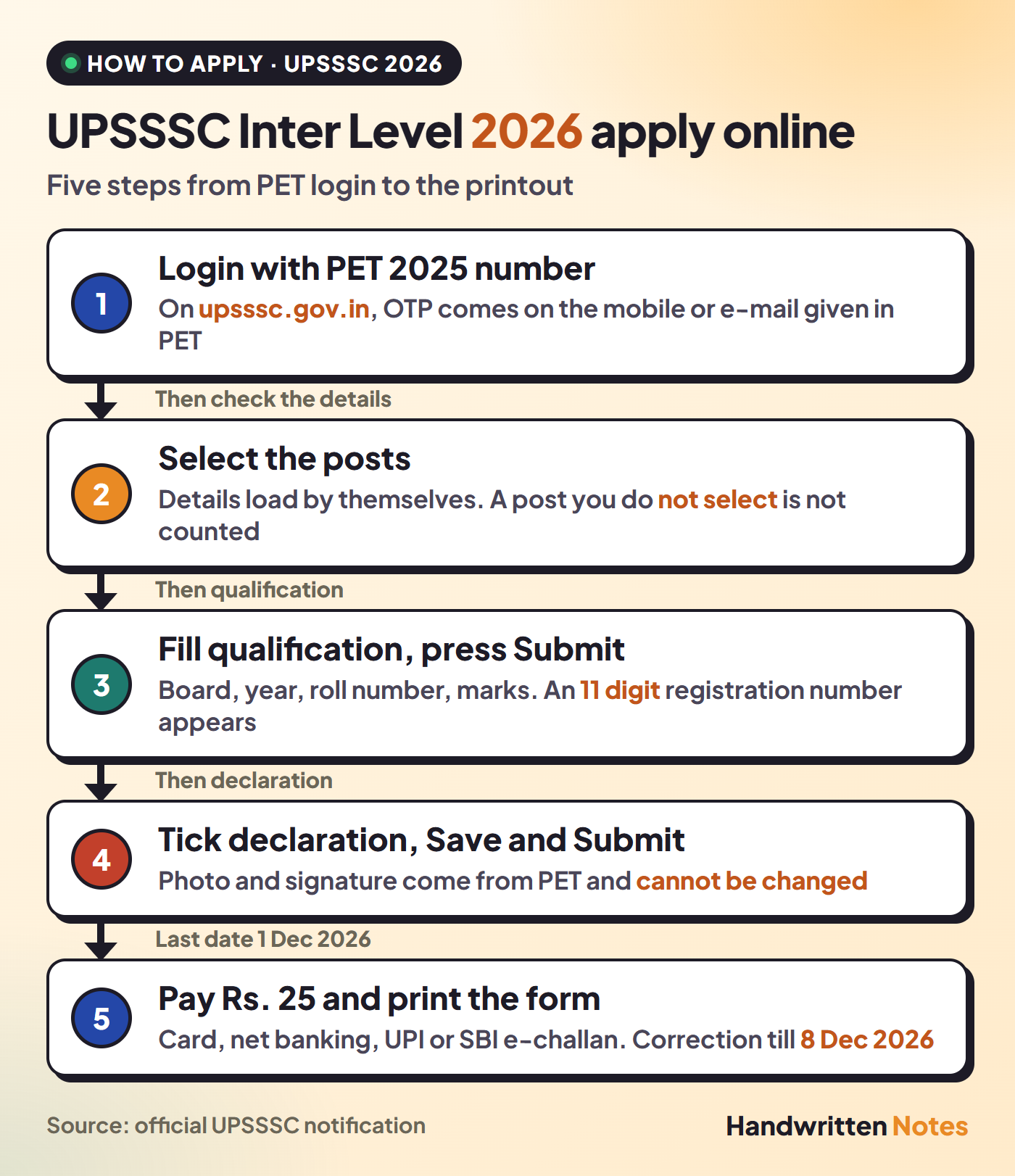
Step 1: Open the advertisement
Go to upsssc.gov.in. On the home page, under the Live Advertisement segment, click the advertisement 26-Exam/2026 and use Download or View to read it. The notice advises to read the whole process before starting, because all the steps can be completed in one sitting.
Step 2: Log in with the PET registration number
Open the application link and Login with your PET 2025 registration number. An OTP is sent to the mobile number or e-mail registered in PET. Enter it to go ahead.
Step 3: Check the Details on the Screen
The personal details of the PET application are displayed by themselves. They include the name, the father's and mother's name, the details of Uttar Pradesh residence, the category, EWS, the horizontal reservation details, the date of birth, gender, marital status, mobile number and e-mail. Read each line . A mistake can be corrected only in a limited way after the final submission (see the correction section).
Step 4: Select the posts
The posts advertised are shown. You must select the post or posts for which you want to apply. The notice warns that a post which is not selected will not be considered, and the claim for it will not be accepted. Select only those posts for which you hold the qualification and the age, as per the table in the eligibility article. At the stage of scrutiny the commission will ask for the order of preference, and it tries to give the posts in that order as far as the merit and vacancy allow.
Step 5: Fill the qualification details
For each selected post, choose Yes or No on whether you hold the required educational qualification. If you choose Yes, enter the name of the board, institute or university, the year of passing, the certificate and roll number, the date of issue of the qualification certificate and the marks. These details must be the same as on the certificate.
Step 6: Verification code and submit
At the bottom of page, type the verification code shown and press the Submit button. The application form then appears, with an 11 digit registration number and the other details. Take a printout and keep it safely, since it has to be shown later if asked.
Step 7: Photo and signature
The photo and the signature uploaded in the PET 2025 application come on the screen automatically. The candidate cannot change them here. So no size or format condition are given in this notice for the picture. After viewing, click Continue to go to the next page.
Step 8: Other details
The page asks Yes or No about the preferential qualification, if any (for example, the service in the Provincial Army or the NCC "B" certificate). The permanent and correspondence address as written in PET are also shown. Choose the answers carefully, since a false claim can cancel the candidature.
Step 9: Declaration
A declaration is displayed at the bottom. After reading it, tick all the check boxes, enter the verification code and click Save and Submit. The fee payment process starts from this point. The notice asks to check all the entries once more before the form is finally submitted.
Step 10: Pay the fee and print the form
After the fee is paid and reconciled, the form is submitted automatically, and the application is displayed on the screen. Download it and print it. The notice says that the printout cannot be taken until the bank has reconciled the fee.
UPSSSC Inter Level 2026 Application Fee and Payment
Item | Amount |
|---|---|
Application fee (UR, OBC, SC, ST) | Rs. 0 |
Online processing fee | Rs. 25 |
Total to be paid | Rs. 25 |
The fee is the same for all the four categories. A candidate of the freedom fighter dependant, ex-servicemen, women, disabled or outstanding sportsperson group pays as per the basic category, so it is Rs. 25 for them too. The fee for the Main Exam is paid separately, only by shortlisted candidates, before the admit card is downloaded. Its amount is not in the notice.
The fee can be paid with a debit or credit card, net banking, UPI or SBI e-challan. The notice clearly says that no other mode is allowed.
Paying by SBI e-challan
Download the SBI e-challan from the website.
Pay the amount at any branch of SBI.
Go back to the Applicant Segment and open the Double Verification Mode option for updating the Transaction ID. Fill the e-challan details there, so that the fee is reconciled.
If the form does not show after the payment
This can happen when the payment is successful but the fee is not matched to the application. In this case, log in on the commission's website with the registration number, open Applicant Segment and choose the Double Verification option. Press Verify Transaction ID. After the fee is matched, download and print the form.
If the payment fails
A Payment Acknowledgment Receipt (PAR) is shown in place of the application. First use the Double Verification option, then choose the Application Fee Deposition option in the same segment and pay again. If a technical problem stops the payment, the same two options can be used up to the last date for the fee.
Check the status
The Applicant's Dashboard (login with the PET registration number) shows the status of the fee. If it is Pending, fill the transaction details under Double Verification and then the next part of the form can be completed.
Correction in the UPSSSC Inter Level 2026 Form
The correction is allowed only after the form has been finally submitted, and only up to 8 December 2026.
Log in through the Applicant's Dashboard with the PET registration number.
Click the Modify Application button shown against the advertisement and enter the verification code.
An OTP will come on the registered mobile number or e-mail. Submit it and the filled form will open.
Only these details can be changed:
Detail | Can it be corrected? |
|---|---|
Address for correspondence | Yes |
EWS and horizontal reservation category (freedom fighter dependants, disabled, ex-servicemen, gender, outstanding sportsperson and others) | Yes |
Compulsory or preferential qualification details | Yes |
Marital status | Yes |
Any other detail | No |
Candidates with disability must also update the category and sub-category of disability in the application, because the Uttar Pradesh government has re-marked the posts for 4 percent reservation. After the correction, download the form again and print it. The notice says that after 8 December 2026 no correction is possible in any condition, and no separate request on this will be taken.
Common Mistakes to Avoid
Waiting for the last date. The fee cannot be paid after 1 December 2026, and the form cannot be finally submitted without the fee.
Skipping the reconciliation. Without it the printout of the application is not available.
Selecting a post for which the qualification or age is not met. Such a candidature can be cancelled at any stage
Not selecting a post at all. The notice says a post which is not selected is not counted.
Submitting more than one application. Only the last one is accepted, but the notice also says that only one application is to be made.
Paying through a mode other than card, net banking, UPI or SBI e-challan.
Keeping no copy. The printout and the registration number are needed at the time of record checking
What to Keep After Applying
Save the printed Application, the 11 digit registration number, the fee receipt or the transaction ID, the PET scorecard and every certificate. The commission does not write to the candidate separately, and every new information is put on its website, so look at upsssc.gov.in often. For help with the online form, the candidate can write to the e-mail ID printed on the first page of the notice (online.upsssc@nic.in) or contact the commission's office in Lucknow on any working day.
Prepare with Handwritten Notes
While the form is being filled, the preparation should also start. The free mock tests have timed papers, the previous year papers page can show the style of questions, and the current affairs pages help with the Current Events section. The mind map notes have chapters of Uttar Pradesh GK, polity, geography and computer, all in the All Access pass.
UPSSSC Inter Level Apply Online 2026 Important Links
Official website: https://upsssc.gov.in
Official notification PDF: use the download button at the top of this article
E-mail printed on the first page of the notice: online.upsssc@nic.in
UPSSSC Inter Level Apply Online 2026 FAQs
Q1. What is the last date to apply online for UPSSSC Inter Level 2026? The last date to register, pay the fee and submit the form is 1 December 2026. The correction and the fee reconciliation can be done till 8 December 2026.
Q2. Where to apply for UPSSSC Inter Level 2026 online? On upsssc.gov.in, through the advertisement 26-Exam/2026 in the Live Advertisement segment. Applications sent by any other way are not accepted.
Q3. Do I need a new registration or OTR? No new registration is mentioned. The login is done with the PET 2025 registration number, and an OTP comes on the mobile number or e-mail given in PET.
Q4. What is the fee for UPSSSC Inter Level 2026 apply online? Rs. 25 as an online processing fee for UR, OBC, SC and ST, and there is no application fee. It can be paid by card, net banking, UPI or SBI e-challan.
Q5. Can I change my photo or signature in the form? No. The photo and signature of the PET 2025 application are shown by themselves, and the notice says the candidate cannot change them.
Q6. My fee was deducted but the form is not showing. What to do? Open the Double Verification option in the Applicant Segment, verify the transaction and then download the form.
Q7. Can I edit the form after submitting it? Yes, but only the address, the EWS and horizontal reservation details, the qualification details and the marital status, and only up to 8 December 2026.
Q8. Is more than one application allowed? Only one application is to be made. If more than one is submitted, the last one is accepted and the others are treated as cancelled.
Q9. Do I have to upload certificates while applying? The steps in the notice do not mention any upload of certificates. They are to be shown when the commission asks for them.
Candidates should read the official notification fully and check upsssc.gov.in again before final submission, since dates and other details can be revised by the commission.
Also Read: More on UPSSSC Inter Level 2026
UPSSSC Inter Level Recruitment 2026: 1,784 Posts, Apply Online
UPSSSC Inter Level Eligibility 2026: Qualification, Age Limit, Posts
 UPSSSC Inter Level Eligibility 2026: Qualification, Age Limit, Posts
 UPSSSC Inter Level Recruitment 2026: 1,784 Posts, Apply Online
 UKSSSC Constable and Fireman Apply Online 2026: Steps, Fee, Documents
