How to Apply for APPSC Group 2 2026: Online Form Step by Step, OTPR, Fee

Updated on 22 November 2026
The APPSC Group 2 apply online 2026 link is live on the Commission's website https://psc.ap.gov.in, and the form closes on 11 December 2026 at 11:59 P.M. Notification No. 37/2026 (10 November 2026) asks for applications for 720 posts of Group-II Services, and any application that comes by another route is rejected without exception, as the notice puts it.
In this article we have given the One Time Profile Registration (OTPR), the form steps, fee payment, the files and certificates to keep ready, the correction window and the mistakes that can lead to rejection. Posts and eligibility are covered in the APPSC Group 2 Recruitment 2026 article.
⬇ Download Official Notification PDF
APPSC Group 2 Apply Online 2026 at a Glance
Particulars | Details |
|---|---|
Notification | 37/2026 dated 10/11/2026 |
Website | |
Mode | Online only |
Start Date | 10 November 2026 |
Last Date | 11 December 2026, 11:59 P.M. |
Registration Needed First | One Time Profile Registration (OTPR) and OTPR ID |
Fee | Rs 250 processing fee + Rs 80 examination fee (examination fee exempt for some categories) |
Fee Mode | Net Banking, Credit Card or Debit Card through the payment gateway |
Correction | Allowed up to 7 days from the last date, Rs 100 per correction |
Screening Test | 21 February 2027 |
Things to Keep Ready Before You Start
Item | What the Notice Says |
|---|---|
OTPR details | Bio-data entered once in OTPR; the data shown at the time of submission is the data used for this notification |
Mobile number and email ID | Those registered in OTPR; the user ID and the OTP or SMS messages come on them, so they should be kept working |
Photograph | Own scanned, recent colour passport size photo, in jpg format |
Signature | Own scanned signature, in jpg format |
Qualification details | Degree and other qualification details, to be filled carefully in the form |
Local status | Whether Local or Non-Local, which is also used to work out the fee |
White Card details | Household Supply White Card details, if the family has one (a fee exemption) |
Post and centre choices | Post preferences and examination centre preferences |
The notice does not give the size in KB, the pixel size or the exact dimensions of the photograph and signature. It says only that they must be uploaded in jpg format, and it tells the applicants to read the user guide on the website. Candidates should follow the Size mentioned in the upload screen. The photograph should be a recent one, and the notice advises the candidates not to change their appearance until the recruitment process is over, since the same photograph may be asked for at verification.
Certificates (Not Uploaded Now, But Needed Later)
The certificates are produced when the Commission calls for the Verification. The formats are available on https://psc.ap.gov.in, and they include a combined community, nativity and DOB certificate, the declaration by the un-employed, the school study certificate, the certificate of residence, the medical certificates for the blind, hearing disability and orthopaedically handicapped candidates, the Non-Creamy Layer certificate and the local status certificate, where it is applicable. A candidate who fails to produce a required certificate will be rejected without any further correspondence.
How to Apply Online for APPSC Group 2 2026: Step by Step
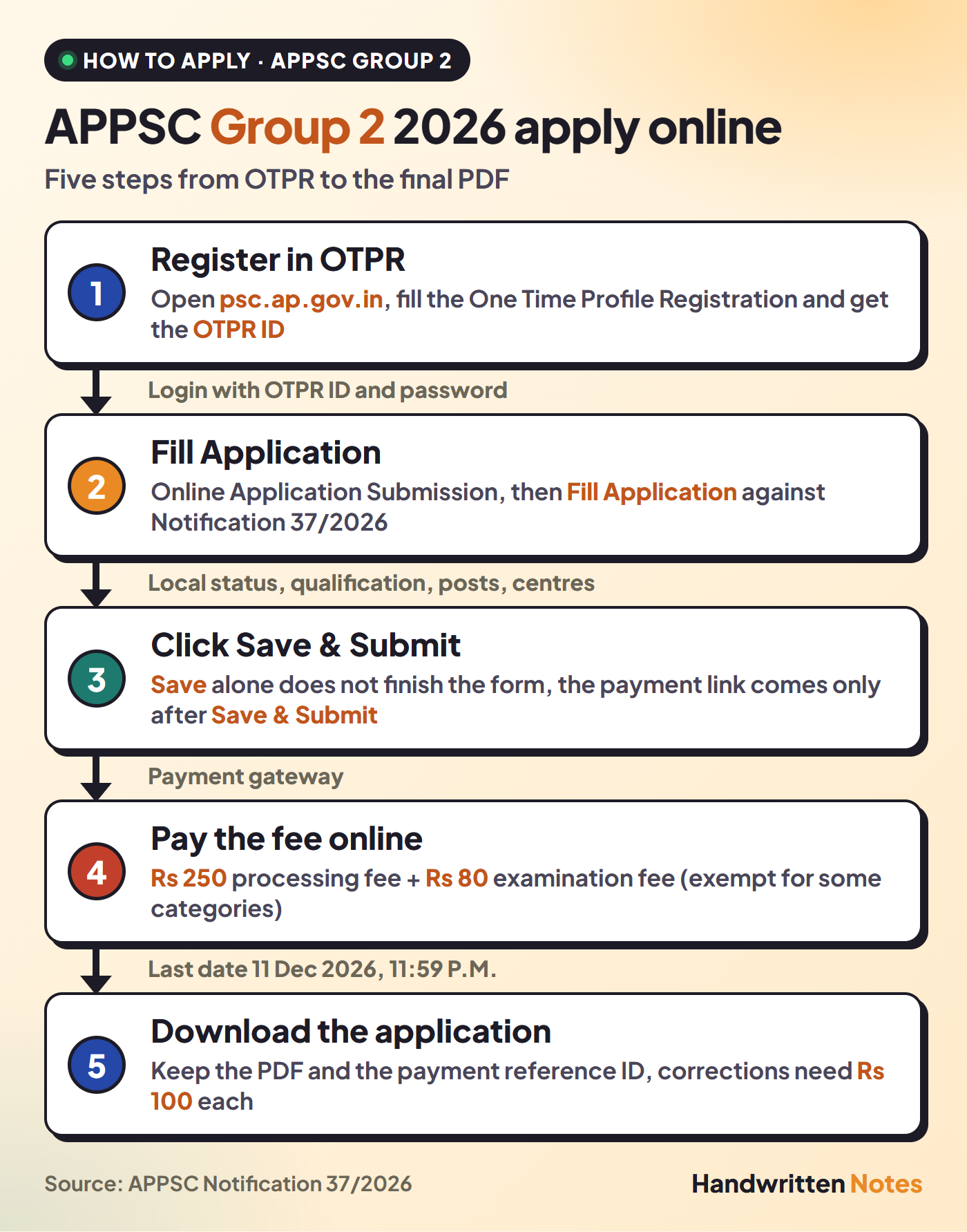
Step I, OTPR. Go to https://psc.ap.gov.in and login with the registered OTPR ID. A candidate who applies for any APPSC notification for the first time has to fill the OTPR form first and get an OTPR ID, which reaches the mobile number and email ID given in the registration. Mistakes made in OTPR are the candidate's own risk, as the Commission takes no responsibility. To change something, use the "modify OTPR" option, save, and then go to Step II.
Step II, Login. Sign in with your OTPR ID as user name and the password you created. Click "Online Application Submission" at the lower right of the website, then press Fill Application next to Notification 37/2026.
Step III, Fill the application. Check the data shown from OTPR. Enter the details specific to this application, like Local or Non-Local status and White card information, as they feed into the fee calculation. Then fill the qualification details, post preferences and examination centres. If you want to change anything in the pre-filled data, use the modify OTPR link, save, and click on Online Application Submission again.
Click Save & Submit. The application has two buttons. "Save" only stores the details partly at the Commission's end. The payment link is generated only when the applicant clicks "Save & Submit". A form that is only saved stays incomplete, and the Commission accepts no responsibility for it.
Payment. After "Save & Submit" the candidate is directed to the payment gateway. On successful payment the application is finally submitted. The system gives a payment reference ID and sends an SMS to your registered mobile.
Download the application. Save a copy of the completed application as PDF for future use.
If payment fails. Start the payment process fresh, as in Step II.
Before you click the final button check all the data. The details used for fee and age relaxation calculation cannot be altered at any stage after the payment form is submitted.
APPSC Group 2 Application Fee 2026
Fee | Amount | Who Pays |
|---|---|---|
Application processing fee | Rs 250 | All applicants |
Examination fee | Rs 80 | All, except the exempted categories below |
Exempted from the Rs 80 examination fee: SC, ST, BC, PBDs and Ex-Servicemen/Personnel; families of Andhra Pradesh residents that hold a Household Supply White Card from the State Civil Supplies Department; and un-employed youth covered by G.O.Ms.No.439 (G.A. Ser-A, 18/10/1996), who must hand over a declaration to the Commission in time.
Applicants of the above categories who come from other States (except PBD and Ex-Servicemen/Personnel) get no fee exemption and no reservation. Applicants of other States pay Rs 80 along with the processing fee of Rs 250, or the application will not be considered. No refund or adjustment of the fee is made in any case. If a candidate does not pay the examination fee in a non-exempt case and the processing fee, the application is rejected. IPOs and demand drafts is not accepted.
Correction Window
After the application is submitted, correction is enabled only after the last date of submission, and only for 7 days from that last date. As the last date is 11 December 2026, the 7 days end on 18 December 2026 by our own count, and the Commission's website will show exact days. Changes are done inside the same application form, and each one costs Rs 100. The fields that affect the Name, the Fee and age relaxation cannot be corrected, and once the window closes nothing can be altered, including community and reservation category. No manual application for correction is accepted.
Common Mistakes to Avoid
Pressing only "Save". The application is complete after "Save & Submit" and a successful payment only.
Changing OTPR data after submitting the application. The data shown at the time of submission is considered for this notification, and later changes in OTPR are not considered.
Leaving a column of the application form blank. A blank relevant column means the form is not accepted, and forms that are incomplete or wrong are rejected outright.
Wrong or false information about eligibility. If a lapse is found, the candidature is rejected even at the final stage, and the candidate is liable to be debarred up to five years from the Commission's examinations.
Skipping the equivalent qualification paper. A candidate with an equivalent qualification must send a copy of the Government Order to the Commission within 10 days of the last date.
Sending a hand written, typed, photostat or printed application form. These are not entertained.
Choosing a wrong Local or Non-local status, which changes the fee and the reservation treatment.
Not telling the employer. A person already in Government service or in an autonomous or aided body has to inform the Head of Office in writing about the application.
After Applying
Hall Tickets for the Screening Test and the Main Examination will be put on the Commission's website, and instructions for downloading will be given there.
The Screening Test (OMR) falls on 21 February 2027, while no date is out yet for the Main Examination. The pattern is in the syllabus and exam pattern article.
The website is the final word for all communication, so candidates should keep visiting it.
The notice gives no helpline number or email address for queries.
Prepare with Handwritten Notes
While the form is being filled, the preparation should start too. The free mock tests give practice for objective papers and the mind map notes cover the common topics of the syllabus. The All Access pass opens every chapter, and the pay scale article lists the scale of each post.
APPSC Group 2 Apply Online 2026 Important Links
Official website and online application: https://psc.ap.gov.in
Official notification PDF (Notification No. 37/2026): download button at the top of this article
Eligibility and age limit: APPSC Group 2 eligibility article
APPSC Group 2 Apply Online 2026 FAQs
Q1. What is the last date to apply for APPSC Group 2 2026? The last date is 11 December 2026, till 11:59 P.M. The online application started on 10 November 2026.
Q2. How to apply online for APPSC Group 2 2026? Register in OTPR on https://psc.ap.gov.in, login, click Online Application Submission, press Fill Application against Notification 37/2026, fill the form, click Save & Submit and pay the fee.
Q3. What is OTPR in APPSC? It is the One Time Profile Registration, where the bio-data of the candidate is stored and an ID is given. The notice says OTPR itself is not an application for any post.
Q4. How much is the APPSC Group 2 application fee? Rs 250 processing fee and Rs 80 examination fee. The Rs 80 part is not charged to SC, ST, BC, PBD, Ex-Servicemen/Personnel, White Card families of the State and un-employed youth with a declaration.
Q5. What is the photo size for APPSC Group 2? The notice only asks for a scanned photograph and signature in jpg format and does not print the size. The upload screen of the website will show the limits.
Q6. Can I edit the APPSC Group 2 application after submission? Yes, but only in the correction window of 7 days after the last date, at Rs 100 per correction. Name, fee and age relaxation fields cannot be corrected.
Q7. Why is my application showing incomplete? If only the Save button was used, the payment link is not generated and the application is treated as incomplete. Go back and use Save & Submit, then pay.
Q8. Is any helpline number given in the notification? No helpline is printed in the notice. Candidates are advised to follow the user guide and notices on the Commission's website.
Disclaimer: Application steps are taken from the notification and can be changed on the website, so please follow the screen instructions and the official PDF before you pay the fee.
Also Read: More on APPSC Group 2 2026
APPSC Group 2 Recruitment 2026: 720 Posts, Notification 37/2026, Apply
APPSC Group 2 Eligibility 2026: Age Limit 18-44, Qualification, Post Wise
APPSC Group 2 Syllabus 2026 and Exam Pattern: Screening Test, Mains, CPT
APPSC Group 2 Salary 2026: Pay Scale by Post, Rs 25,220 to Rs 1,30,580
 APPSC Group 2 Recruitment 2026: 720 Posts, Notification 37/2026, Apply
 APPSC Group 2 Syllabus 2026 and Exam Pattern: Screening Test, Mains, CPT
 APPSC Group 2 Salary 2026: Pay Scale by Post, Rs 25,220 to Rs 1,30,580
